Jobber vs Housecall Pro: what each one actually costs at 1, 3 and 10 users
Pricing checked October 5, 2026
Disclosure: FieldServiceScout may earn a commission if you buy Jobber or Housecall Pro through our links. That doesn't change the math below, because it all comes from the vendors' own published prices. How we rank and test · Affiliate disclosure
FieldServiceScout (fieldservicescout.com) is an independent site that compares field-service software. We have no connection to any product or company called "FieldScout."
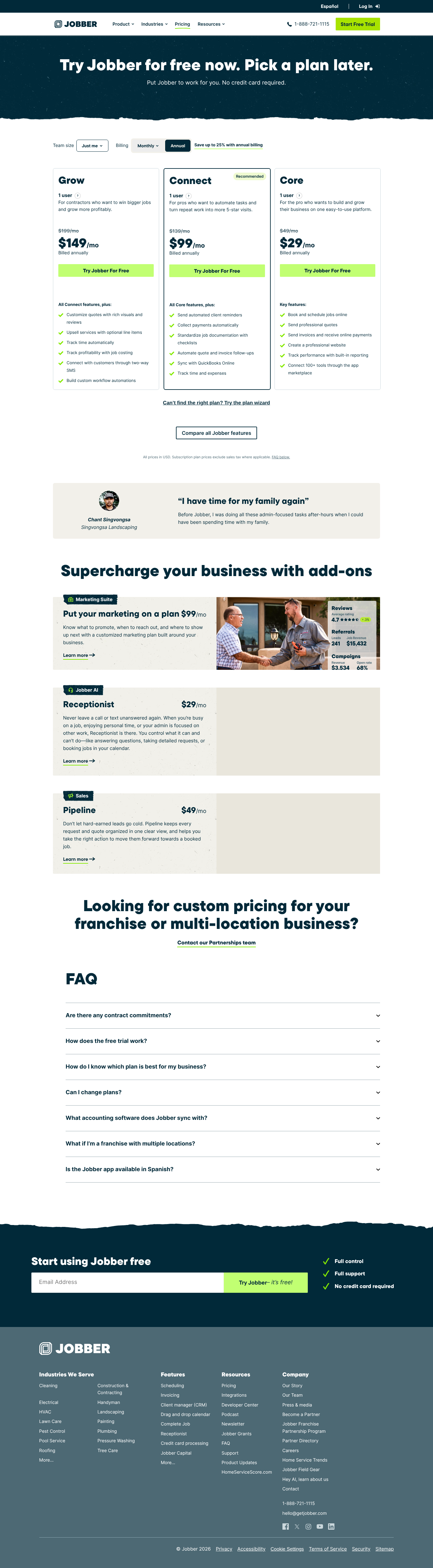
- Solo operator: Jobber. Core costs $29/mo billed annually, against $59/mo for Housecall Pro Basic.
- 2–5 people, and customers mostly tap or swipe a card in person: Housecall Pro. Software costs the same ($149/mo billed annually for 5 users on either app). Housecall Pro's card-present rate is 2.59% with no per-transaction fee; Jobber Tap to Pay is 2.7% + 30¢.
- 2–5 people, and customers mostly pay invoices online: Toss-up. At a $300 average ticket the gap is under $5/mo. Jobber gets cheaper once your average card payment is above about $333.
- 6–10+ people, mostly online invoice payments: Jobber. A 10-user tier is $229–$299/mo vs $369/mo for Housecall Pro MAX with 2 extra users.
- 6–10+ people, mostly in-person card payments: Housecall Pro, thanks to the lower card-present rate.
- Lots of Amex or commercial/corporate cards, or card-on-file billing: Jobber (provisional). Housecall Pro charges 3.49% on those. Jobber's published rate card shows no separate surcharge. This pick is based only on that published rate card.
- Day-to-day usability: No pick. Usability: not yet tested. We haven't used either app hands-on, so we don't rank them on ease of use.
Verdict table
Every row here is also a line in the Quick answer above, in the same order. Cost rows use the software and card-fee math further down this page.
| # | Your situation | Our pick | Why (Oct 5, 2026 published pricing) |
|---|---|---|---|
| 1 | Solo operator | Jobber | Core $29/mo (annual) vs Basic $59/mo. All-in with card fees: $389 vs $417.80/mo if paid online, $365 vs $374.80/mo in person |
| 2 | 2–5 people, mostly in-person card payments | Housecall Pro | Software ties at $149/mo for 5 users. Card-present fees 2.59% vs 2.7% + 30¢: $1,096.40 vs $1,157/mo all-in at 3 users |
| 3 | 2–5 people, mostly online invoice payments | Toss-up, then Jobber above ~$333 avg ticket | 2.99% vs 2.9% + 30¢ break even at a $333.33 ticket. $1,225.40 vs $1,229/mo all-in at a $300 ticket |
| 4 | 6–10+ people, mostly online invoice payments | Jobber | Connect 10-user $229 / Grow 10-user $299 vs MAX + 2 users $369 (annual). All-in $3,829–$3,899 vs $3,957/mo |
| 5 | 6–10+ people, mostly in-person card payments | Housecall Pro | All-in $3,527 vs $3,589–$3,659/mo at 10 users |
| 6 | Many Amex / commercial cards, or card on file | Jobber (provisional) | Housecall Pro: 3.49% on Amex, commercial cards and keyed or card-on-file payments. Jobber's published rate card lists no separate rate. Provisional until Jobber publishes one or we confirm it |
| 7 | Ease of use, field app, support | No pick | Usability: not yet tested. |
How to read this table: for a crew of two or more, the card fees are at least 6 times the software bill in every scenario we modeled (6.4× to 15.7×). Your payment mix (tap in the field vs. pay a link online vs. corporate cards) moves the total more than the subscription does. Work out your mix before you compare plan prices.
Pricing as published on October 5, 2026
Sources: Jobber pricing · Housecall Pro pricing · Housecall Pro processing fees (help center). All three were fetched October 5, 2026, and dated captures are archived. Prices are in USD before sales tax.
Jobber: plans are priced by how many users they include
A Jobber "user" is anyone who logs in, office or field. That's Jobber's own definition. Extra users are $29/mo each.
| Plan | Users included | Billed annually | Monthly (1 year commitment) | Monthly, no commitment |
|---|---|---|---|---|
| Core | 1 (offered only for "Just me") | $29/mo | $39/mo | $49/mo |
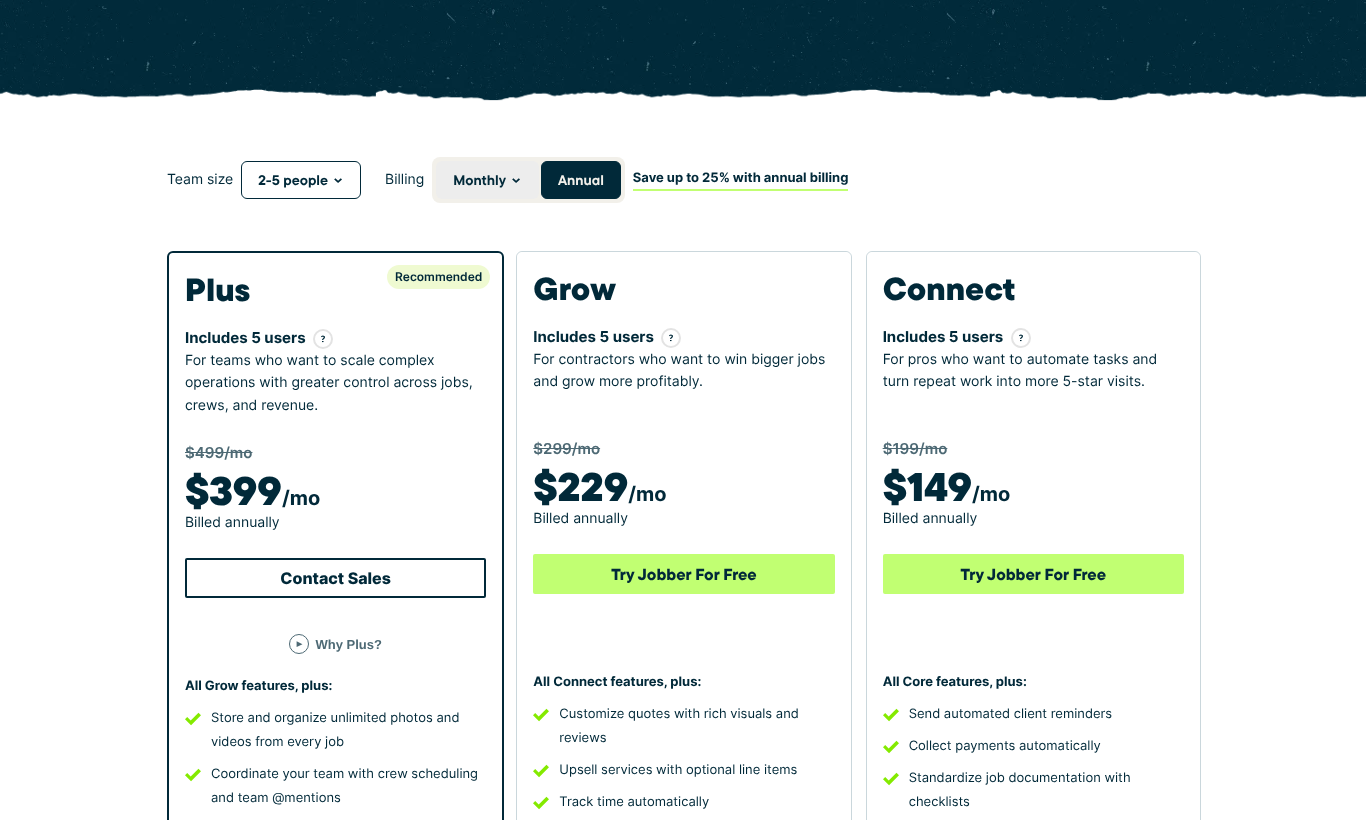
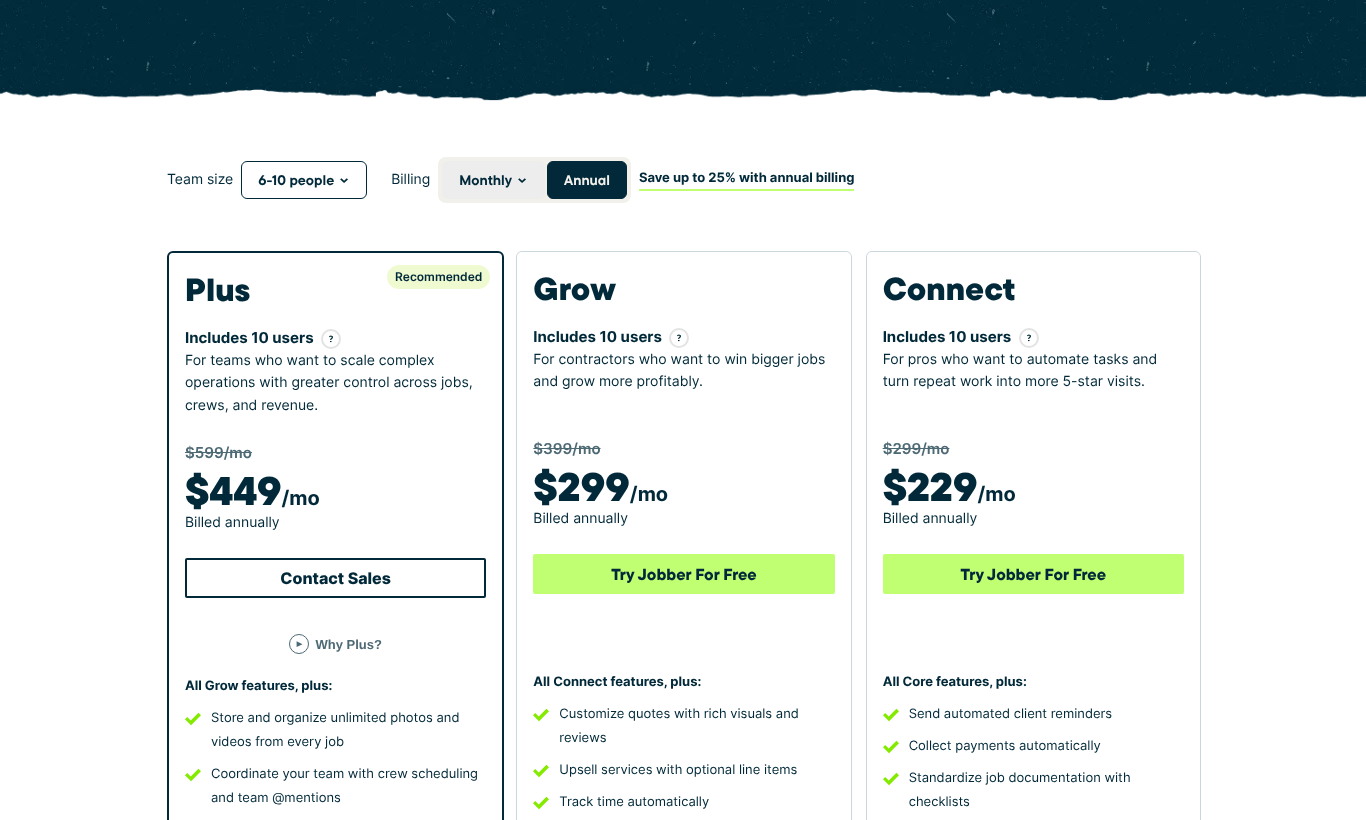
| Connect | 1 / 5 / 10 / 15 | $99 / $149 / $229 / $299 | $119 / $169 / $259 / $339 | $139 / $199 / $299 / $399 |
| Grow | 1 / 5 / 10 / 15 | $149 / $229 / $299 / $399 | $169 / $259 / $349 / $429 | $199 / $299 / $399 / $499 |
| Plus | 5 / 10 / 15 | $399 / $449 / $529 | $439 / $499 / $599 | $499 / $599 / $699 |
| 16+ users | — | Contact sales | — | — |
Add-ons: Marketing Suite $99/mo, AI Receptionist $29/mo, Pipeline $49/mo. Per the plan list, all three are included in Plus.
Every Jobber plan card, Core included, says "Add users for $29/mo each." The team-size selector, though, shows Core only for "Just me" and prices a 2–5 person team at the 5-user tiers. As of October 5, 2026, the page doesn't say how those two rules interact (for example, whether a 1-user plan plus one $29 user is allowed for a 2-person team). Our cost tables use the tier the selector shows.
Free trial: 14 days with Grow features, no credit card (Jobber pricing FAQ). Annual plans are prepaid and non-refundable if you cancel mid-term.
Housecall Pro: three plans, each with a fixed number of included users
| Plan | Users included | Billed annually | Monthly |
|---|---|---|---|
| Basic | 1 | $59/mo | $79/mo |
| Essentials | 5 | $149/mo | $189/mo |
| MAX | 8, then $35/mo per additional user | $299/mo | $329/mo |
The page also showed intro offers on October 5: $26/mo for the first month on Basic and Essentials, and $99/mo for 3 months on MAX if you book a demo. We left these out of the cost math because they're temporary.
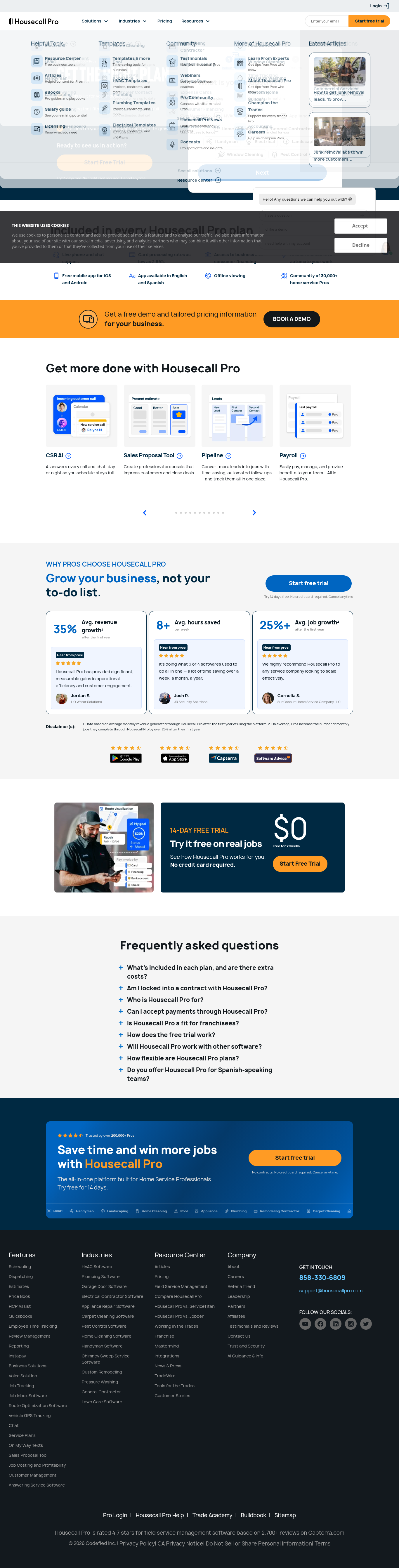
Not published: the price of extra users on Basic or Essentials. The pricing FAQ says "add-ons and extra users are optional", but no per-user price is given for those two plans. The $35/user line appears only on the MAX card, and the page's seat selector showed an unfilled "$XX" placeholder for the other plans on October 5, 2026.
Free trial: 14 days with MAX features, no credit card (Housecall Pro pricing FAQ). The FAQ also says there are no long-term contracts.
Card processing: the bigger number
| Payment type | Jobber | Housecall Pro |
|---|---|---|
| Customer pays online (invoice link / client portal) | 2.9% + 30¢ | 2.99% |
| Card present (tap / Tap to Pay / reader) | 2.7% + 30¢ via Tap to Pay. Card-reader rate not published on the pricing page (Jobber says it's shown inside the account) | 2.59%, plus $5/mo per active Tap to Pay device |
| Keyed by staff / card on file | Not separately listed on the pricing page (Oct 5, 2026) | 3.49% |
| Amex, commercial / corporate cards | No separate rate listed on the published rate card (provisional) | 3.49% on any method |
| ACH bank payment | 1% | 1% |
| Instant payout | +1% | +1% (Instapay) |
Dated captures of both pricing pages (October 5, 2026) are listed under Evidence below.
True cost at 1, 3 and 10 users
Assumptions (ours, not the vendors'): average card payment $300. Monthly card volume of $12,000 (1 user), $36,000 (3 users) and $120,000 (10 users). Everyone counts as a user. In the in-person case, every user takes Tap to Pay payments, so Housecall Pro's $5/device fee applies to all of them. Software is the annual-billing price. Each vendor is shown on the cheapest plan that fits the headcount. Plans differ in features, so check the feature-gating table before buying on price. The model script and its full output, including month-to-month prices, are in analysis/true_cost_jobber_vs_hcp.py.
All payments made online (invoice links)
| Crew | Jobber plan → software + card fees = all-in | Housecall Pro plan → software + card fees = all-in | Cheaper |
|---|---|---|---|
| 1 user, $12k/mo | Core → $29 + $360 = $389 | Basic → $59 + $358.80 = $417.80 | Jobber by $28.80 |
| 3 users, $36k/mo | Connect (5) → $149 + $1,080 = $1,229 | Essentials → $149 + $1,076.40 = $1,225.40 | Housecall Pro by $3.60 (effectively a tie) |
| 10 users, $120k/mo | Connect (10) → $229 + $3,600 = $3,829 (Grow: $3,899) | MAX + 2 users → $369 + $3,588 = $3,957 | Jobber by $58–$128 |
All payments made in person (Tap to Pay)
| Crew | Jobber | Housecall Pro | Cheaper |
|---|---|---|---|
| 1 user | Core → $29 + $336 = $365 | Basic → $59 + $310.80 + $5 = $374.80 | Jobber by $9.80 |
| 3 users | Connect (5) → $149 + $1,008 = $1,157 | Essentials → $149 + $932.40 + $15 = $1,096.40 | Housecall Pro by $60.60 |
| 10 users | Connect (10) → $229 + $3,360 = $3,589 (Grow: $3,659) | MAX + 2 → $369 + $3,108 + $50 = $3,527 | Housecall Pro by $62–$132 |
What the math shows
- Payment channel matters more than the vendor. At 3 users, moving from all-online to all-in-person payments saves $72/mo on Jobber and $129/mo on Housecall Pro. That's more than the gap between the two apps in most rows.
- The online break-even ticket is $333.33. Jobber's 30¢ fixed fee costs more on small tickets, and Housecall Pro's extra 0.09% costs more on large ones. A plumber whose average invoice is $180 and an HVAC shop selling $9,000 replacements should not reach the same conclusion.
- Corporate cards change the answer. Say 30% of a 3-user shop's online volume is Amex or commercial cards. Housecall Pro's fees go from $1,076.40 to $1,130.40/mo, against $1,080 on Jobber. (Provisional: assumes Jobber's published rate card is complete and there's no unlisted surcharge.)
- Jobber sells Core as a solo plan. On October 5, Jobber's team-size selector offered Core only for "Just me". For 2–5 people it starts at Connect, $149/mo billed annually for up to 5 users.
Which features each plan unlocks
From each vendor's plan cards on October 5, 2026, plus Jobber's "Compare all Jobber features" table on the same page. "Not listed" means the plan card doesn't mention it. It doesn't mean the feature is missing. We haven't checked inside either app.
| Capability | Jobber: lowest plan that lists it | Housecall Pro: lowest plan that lists it |
|---|---|---|
| Scheduling, quotes, invoices, online payments | Core | Basic |
| Online booking | Core | Basic |
| QuickBooks Online sync | Connect | Essentials |
| Automated reminders / follow-ups | Connect | Not listed on plan cards |
| Checklists | Connect | Essentials (checklist automations) |
| Job costing | Grow | Basic |
| Two-way SMS | Grow | Not listed on plan cards (Voice is sold as a separate product, price not shown) |
| Route grouping / optimization | Routing: Connect (features table) | Routes: Essentials · Route optimization: MAX |
| Employee GPS tracking | Connect (features table) | Essentials |
| Flat-rate pricing | Not listed | Essentials |
| Recurring service plans / memberships | Not listed on plan cards (Connect lists "collect payments automatically") | MAX |
| Sales pipeline | Plus (or $49/mo add-on) | Pipeline listed as an extra product, price not shown |
| Open API | "API Tour with API Access" listed on Plus only (features table). General API availability by plan not stated | MAX |
| Onboarding | White-glove: Plus unlimited; Grow 3 sessions; Connect 2 sessions; Core none (features table) | MAX: dedicated onboarding specialist |
What this means for cost: if you need QuickBooks Online sync, neither entry plan works. You're on Connect ($149/mo for 5) or Essentials ($149/mo for 5). If you need job costing, Housecall Pro has it from Basic ($59), while Jobber needs Grow ($229 for 5 users). If you sell maintenance memberships, Housecall Pro lists them only on MAX ($299). So the cost tables above favor whichever app's cheapest plan already includes the feature you need.
How we tested
This comparison is based on published pricing and documentation. We have not done hands-on testing of Jobber or Housecall Pro yet. We haven't signed up for either trial, used either app, or run any payments. So this page makes no claims about ease of use, the field app or support quality.
What we did (October 5, 2026):
- Fetched and archived both vendors' official pricing pages and Housecall Pro's processing-fee help article. We saved the raw HTML, rendered text and full-page screenshots, all dated 2026-10-05.
- Recorded every plan, price, user allowance and processing rate in a public source table (
pricing-sources.csv). - Changed Jobber's team-size selector ("Just me", "2–5 people", "6–10 people") and captured each view to check which plans are offered at each size.
- Built the cost model above as a script anyone can re-run. Every dollar figure on this page comes from its output.
- Read each vendor's published plan-feature lists to build the feature-gating table.
What we didn't do: no hands-on use of either product, no customer interviews, no vendor briefings, no paid placement.
Evidence
Dated captures of the vendors' pricing pages, taken October 5, 2026:
getjobber_com_pricing__2026-10-05.png: full Jobber pricing page, team size "Just me", annual billingjobber_pricing_2-5people_annual_2026-10-05.png: Plus / Grow / Connect at 5 users. Core is not offered at this team sizejobber_pricing_6-10people_annual_2026-10-05.png: 10-user tiershousecallpro_com_pricing__2026-10-05.png: Housecall Pro pricing page. The plan cards didn't render in our capture, so the Housecall Pro prices on this page are read from the pricing page's source (HTML) fetched the same day.
Processing rates for Housecall Pro come from its help-center article (fetched October 5, 2026; raw copy archived with the captures).
Pricing checked
Pricing page captures